
Fleets Run Smarter on Flatirons.

OVERVIEW
Take Off Faster with Flatirons Fleet Edition
Aviation content is a maze with multiple standards, tons of OEMs, and an endless array of manuals. But Flatirons Fleet Edition cuts through the clutter. Whether it’s ATA iSpec 2200, S1000D, or unstructured data, the Fleet Edition delivers the right content to your team right when they need it. With all of your technical information—from airframes to engines to components—consolidated in one powerful platform, your organization can maximize productivity, minimize downtime, and keep your maintenance operations running at peak performance.
Use Cases
Streamline Repairs: From Tool Time to Go Time
Too Many Logins and Too Many Viewing Platforms
Before: Turbulence Ahead: Your Content Management Nightmare
Managing your technical content shouldn’t feel like running an obstacle course. Fleet operators struggle with juggling multiple systems, training users on various platforms, and dealing with static OEM content that’s slow to adapt to field feedback. On top of that, legacy systems often fail to adapt to user needs, slowing down operations and leaving teams stuck in the past. This causes increased complexity, slower updates, and missed opportunities for improvement.
After: One Login, All Your Info, Fast and Easy
Leave behind scattered data and complicated logins—all your technical information is housed in a single accessible source with just one login. Predictive search makes finding data faster than ever, while manual-specific search capabilities let you zero in on precisely what you need. Plus, intelligent interlinking between manuals ensures seamless navigation, with embedded references that connect the dots for you. Our goal is simple: to make your fleet-wide operations run smarter, smoother, and more efficiently—keeping the competitive advantage in your hands, where it belongs.
The Case of Too Many Updates Slowing You Down
Before: Still Waiting on That Update? Your Fleet Is Too.
Time is money in aviation, and relying on outdated OEM content costs you both. The slow pace of reconciling revisions, along with manual formatting that delays the authoring process, and the lack of centralized management for multiple document types all contribute to a sluggish workflow in driving content to the people who need it most in your organization. With field feedback that can’t be acted on quickly, the maintenance process becomes bogged down by outdated practices, entangling your team in inefficiencies.
After: Much-Needed Lift to Fly Through Documentation
Accelerate your documentation revision processes with quicker reconciliation of COC (your organization’s specific changes) and new OEM revisions. Revise XML manuals in record time while reusing common objects within the structured content. With user-friendly WYSIWYG authoring tools and dialog boxes, every task becomes easier, faster, and more efficient, helping you deliver accurate, compliant manuals in no time.
Too Many Logins and Too Many Viewing Platforms
After: One Login, Endless Possibilities
Accessing technical data has never been easier. With just one login, you have a single source of truth, a predictive search for quick results, and manual-specific searches that work intuitively. Intelligent interlinking seamlessly connects all your manuals, while offline feedback tools capture every critical input. Whether working online or offline, everything you need is right at your fingertips—making your workflow smoother and more efficient.
After: Much-Needed Lift to Fly Through Documentation
Accelerate your documentation revision processes with quicker reconciliation of COC (your organization’s specific changes) and new OEM revisions. Revise XML manuals in record time while reusing common objects within the structured content. With user-friendly WYSIWYG authoring tools and dialog boxes, every task becomes easier, faster, and more efficient, helping you deliver accurate, compliant manuals in no time.
The Case of Too Many Updates Slowing You Down
Before: Still Waiting on That Update? Your Fleet Is Too.
Time is money in aviation, and relying on outdated OEM content costs you both. The slow pace of reconciling revisions, along with manual formatting that delays the authoring process, and the lack of centralized management for multiple document types all contribute to a sluggish workflow in driving content to the people who need it most in your organization. With field feedback that can’t be acted on quickly, the maintenance process becomes bogged down by outdated practices, entangling your team in inefficiencies.
After: Much-Needed Lift to Fly Through Documentation
Accelerate your documentation revision processes with quicker reconciliation of COC (your organization’s specific changes) and new OEM revisions. Revise XML manuals in record time while reusing common objects within the structured content. With user-friendly WYSIWYG authoring tools and dialog boxes, every task becomes easier, faster, and more efficient, helping you deliver accurate, compliant manuals in no time.
Explore Use Cases for Technicians by Role
Explore use cases For Administrators by role
Key Benefits
Improve Your Operational Efficiency
Turbocharge Your Technicians: No More System-Hopping Gymnastics
Keep your technicians in the cockpit of productivity with instant data access—no more jumping between systems or searching through endless paper trails. With features like predictive search, easy-to-use digital tools, and real-time task updates, technicians can complete tasks efficiently, reducing downtime and increasing overall throughput.
Multi-OEM Fleet Management: When “Multi-OEM” Doesn’t Mean “Multi-System”
You can access all your airframes, engines, and components, as well as company manuals, CMMs, and PDFs, all in one place. Forget the hassle of switching between systems or formats—just smooth, efficient operations that keep your fleet flying high and performing at its best.
Discover Key Benefits for Technicians by Role
Explore key benefits For Administrators by role
Key Features
Maximize Aircraft Utilization
Instant Access, Instant Results—On Every Device
View and Edit Technical Content with Flatirons Pinpoint Maintenance crews benefit from quick, on-the-go access to data via desktops, kiosks, and tablets. Whether on iOS, Windows, or Android, Pinpoint is compatible with any mobile device. It allows technicians to swiftly retrieve the right information to complete the job accurately and on time.
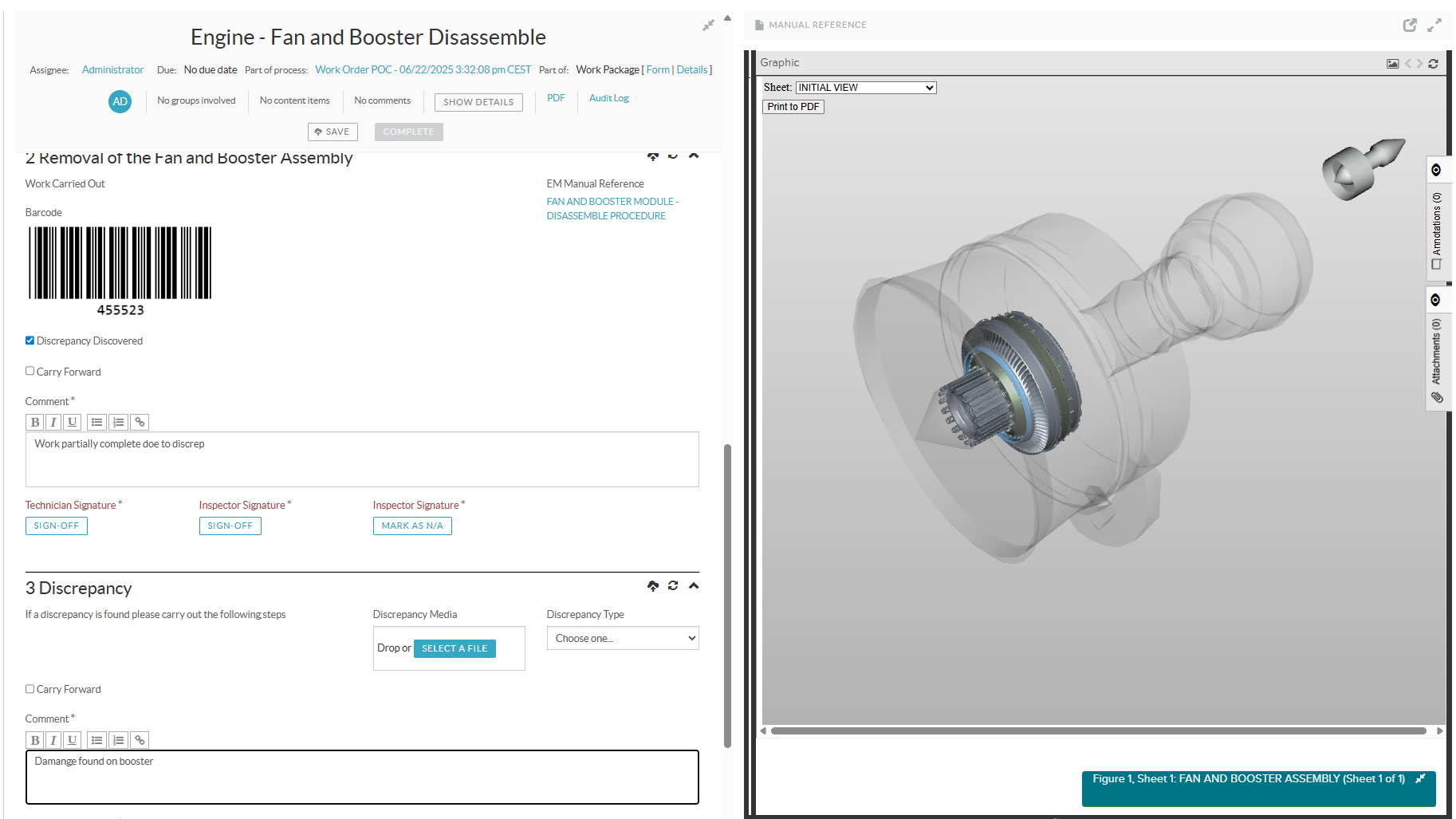
Maintenance Task Cards on Demand: Access, Create, and Capture Anywhere
Simplify Work Card Management with Flatirons eTaskcard
Transform maintenance with ultra-efficient digital work cards that let engineers and technicians access their job task cards from any device—mobile, kiosk, desktop, or laptop. Create non-routine cards on the spot, snap photos with a tablet or mobile camera, and instantly sync new tasks with your evaluation queue, all in real time. Work task cards have never been this efficient, converting performance gains directly into bottom-line savings.
Cruise Toward Maximum Authoring Productivity
Author, manage, and publish with Flatirons Knowledge Center & Studio
A powerhouse CMS that goes beyond document management—create detailed, feature-rich technical publications with advanced version tracking and easily manage connections between topics, graphics, publications, and other regulated content. It also seamlessly manages S1000D and ATA iSpec 2200 content in the authoring and CMS environment, helping you make the content your own.

FLATIRONS FLEET EDITION
Tired of Productivity Potholes? Your Turnaround Starts Here
In today’s fast-paced, highly regulated industry, airlines must maximize their aircraft utilization while ensuring safety, compliance, and profitability. That’s where our highly configurable Flatirons Fleet Edition comes into play by minimizing downtime and maximizing fleet availability. It places all that technical content right at your technician’s fingertips, making maintenance operations more efficient.

Flatirons Pinpoint
Quickly access and view airframe, engine, and component manuals in our leading IETP viewer

Flatirons eTaskcard
Import, revise, and deliver the latest up-to-date maintenance work task cards

Flatirons Knowledge Center
Track content in detail by monitoring versions between key materials as well as create and manage XML and SGML content for S1000D and ATA iSpec 2200 standards
Flatirons Pinpoint is a premier IETP viewer that brings your technical content to life in ways you never imagined. Effortlessly access and navigate everything from S1000D and ATA iSpec 2200 to service bulletins and PDFs on a single unified platform. Whether you’re viewing online or offline, Pinpoint ensures your team has real-time, intelligent content at their fingertips, ready for action. With features like on-the-fly applicability filtering, intuitive search, and inline reference expansion, finding the right information is as easy as a click. Pinpoint adds a new dimension to your manuals, featuring 3D visuals, decision-based maintenance procedures, and multimedia that make complex data clear and actionable. You can even make quick edits, add supplements, and share the most up-to-date content across your teams, all while maintaining a smooth and efficient workflow.
Get your work order executions done faster and smarter with Flatirons eTaskcard. With built-in workflows, custom processes, and form-based task card creation, this all-in-one solution enhances your operations from start to finish. Add technician and inspector signoffs, capture photos, and easily complete required data fields. Need to export? eTaskcard includes PDF generation for executed work orders. Plus, it integrates seamlessly with your ERP and maintenance scheduling systems, ensuring your existing tech stack works harder for you.
Managing fleet technical specifications just became easier with Flatirons Knowledge Center and Studio. Airlines can streamline the creation and revision of maintenance manuals, engineering documents, and other technical publications—all in one place. Whether it’s standard or custom content, Flatirons Knowledge Center simplifies the assembly, editing, and delivery of documents across various formats and output channels. With Flatirons Studio, you get a powerful XML content authoring platform that supports industry specs like iSpec 2200, S1000D, and DITA. Major airlines use Studio to edit OEM XML content, such as AMMs, EMs, IPCs, WDMs, and task cards, and to create new XML content, such as company manuals. Used separately or together, these advanced content and authoring solutions deliver the precision and agility required for today’s complex fleet requirements.
Flatirons Pinpoint
Quickly access and view airframe, engine, and component manuals in our leading IETP viewer
Flatirons Pinpoint is a premier IETP viewer that brings your technical content to life in ways you never imagined. Effortlessly access and navigate everything from S1000D and ATA iSpec 2200 to service bulletins and PDFs on a single unified platform. Whether you’re viewing online or offline, Pinpoint ensures your team has real-time, intelligent content at their fingertips, ready for action. With features like on-the-fly applicability filtering, intuitive search, and inline reference expansion, finding the right information is as easy as a click. Pinpoint adds a new dimension to your manuals, featuring 3D visuals, decision-based maintenance procedures, and multimedia that make complex data clear and actionable. You can even make quick edits, add supplements, and share the most up-to-date content across your teams, all while maintaining a smooth and efficient workflow.
Flatirons eTaskcard
Import, revise, and deliver the latest up-to-date maintenance work task cards
Get your work order executions done faster and smarter with Flatirons eTaskcard. With built-in workflows, custom processes, and form-based task card creation, this all-in-one solution enhances your operations from start to finish. Add technician and inspector signoffs, capture photos, and easily complete required data fields. Need to export? eTaskcard includes PDF generation for executed work orders. Plus, it integrates seamlessly with your ERP and maintenance scheduling systems, ensuring your existing tech stack works harder for you.
Flatirons Knowledge Center
Track content in detail by monitoring versions between key materials as well as create and manage XML and SGML content for S1000D and ATA iSpec 2200 standards
Managing fleet technical specifications just became easier with Flatirons Knowledge Center and Studio. Airlines can streamline the creation and revision of maintenance manuals, engineering documents, and other technical publications—all in one place. Whether it’s standard or custom content, Flatirons Knowledge Center simplifies the assembly, editing, and delivery of documents across various formats and output channels. With Flatirons Studio, you get a powerful XML content authoring platform that supports industry specs like iSpec 2200, S1000D, and DITA. Major airlines use Studio to edit OEM XML content, such as AMMs, EMs, IPCs, WDMs, and task cards, and to create new XML content, such as company manuals. Used separately or together, these advanced content and authoring solutions deliver the precision and agility required for today’s complex fleet requirements.
Resources
Explore More From Flatirons
Request a Demo
Shape Fleet-Wide Efficiency to Your Advantage
Are you curious about Flatirons Fleet Edition? Contact us, and we’ll gladly answer all your questions or arrange a demo so you can see the value for yourself.
Demo Request
2-column form layout from template